The nine specifiers handle conversion — turning values into the
characters they represent. The flag system handles presentation:
alignment, padding, sign display, prefix notation, and truncation. It
is the part of printf most people have used without thinking about
how it works. Both are part of the same implementation.
Format specifier grammar
The full syntax for a conversion specifier is:
%[flags][width][.precision]specifierEach component is optional except the specifier, and they always appear in this order:
%-10.5s   →   '-' flag, width 10, precision 5, specifier 's'
%08d      →   '0' flag, width 8, no precision, specifier 'd'
%+d       →   '+' flag, no width, no precision, specifier 'd'
%#010x    →   '#' and '0' flags, width 10, no precision, specifier 'x'
%%        →   no flags, no width, no precision, specifier '%'
The page 03 dispatcher
reads only the specifier. To support flags, width, and precision, it
must parse everything between % and the specifier before dispatching.
What the flags do
Run man 3 printf and search for Flag characters — the manual
documents the full specification that tci_printf implements.
| Flag | Effect |
|---|---|
- | Left-align within the field width (default is right-align) |
0 | Pad with zeros instead of spaces (numeric specifiers only) |
+ | Always print a sign for signed numbers (+123, -456) |
| Print a leading space for positive numbers ( 123, -456) |
# | Alternate form: 0x/0X prefix for %x/%X |
%10s   "hello"       →  "     hello"   (right-aligned, default)
%-10s  "hello"       →  "hello     "   (left-aligned with -)
%08d   255           →  "00000255"     (zero-padded with 0)
%+d    7             →  "+7"           (explicit sign with +)
%+d    -7            →  "-7"
% d    7             →  " 7"           (space prefix for positive with ' ')
% d    -7            →  "-7"
%#x    255           →  "0xff"         (0x prefix with #)

%.5s   "hello world" →  "hello"        (string truncated to precision)
%.5d   7             →  "00007"        (integer zero-padded to precision)
Field width is a decimal integer after the flags. %10d prints in a
field at least 10 characters wide, right-aligned and space-padded on
the left. %-10d left-aligns. %010d zero-pads to 10 digits. If the
value already exceeds the width, no truncation occurs — the field
simply expands.
Precision follows a .: %.5s prints at most 5 characters of the
string. %.3d zero-pads the integer to at least 3 digits. A . with
no following number means a precision of zero — %.d with value 0
prints nothing.
Width and precision can be *, which means the value comes from the
next argument in the list as an int. A negative * width sets the
- flag and uses the absolute value as the width. A negative *
precision is treated as if no precision was given.
Interaction rules
Two flag pairs interact, and the rules must be applied after parsing:
-overrides0.%-05dwith value 7 produces7(left- aligned, space-padded), not zero-padded. Zero-padding only applies to right-aligned numeric output — there is nothing meaningful to zero-pad on the left when the content is on the left.+overrides+takes precedence. The space flag only applies when no sign is otherwise printed.
Parsing the flags
parse_fmt is a single forward pass through the format string. It moves
through four consecutive sections — flags, width, precision dot, precision
value — stopping as soon as it sees a character that does not belong to
the current section:
Define a struct to carry the parsed options. The typedef struct s_fmt form is the tagged variant of the pattern introduced in
f05/06
— the tag (s_fmt) allows the struct to name itself if needed. Every
field is accessed through the f pointer with ->:
typedef struct s_fmt
{
    int  minus;          /* '-': left-align */
    int  zero;           /* '0': zero-pad instead of space-pad */
    int  plus;           /* '+': always print sign */
    int  space;          /* ' ': space-prefix positive numbers */
    int  hash;           /* '#': alternate form (0x/0X prefix) */
    int  width;          /* minimum field width */
    int  precision;      /* precision value (-1 = not given) */
    int  has_precision;  /* 1 if '.' was present, even if precision is 0 */
}   fmt_t;
precision and has_precision are separate fields because %.0d
(zero precision, explicit dot) behaves differently from %d (no
precision). %.0d with value 0 prints nothing; %d with value 0
prints 0. The precision = -1 sentinel marks the field as absent;
has_precision = 1 with precision = 0 records that the dot was
given without a following digit.
Write a parse_fmt function that reads from fmt starting at the
position after % and fills a fmt_t. It returns the updated index
positioned at the conversion specifier:
static int  parse_fmt(const char *fmt, int i, fmt_t *f, va_list *args)
{
    tci_memset(f, 0, sizeof(*f));                /* zero all fields */
    f->precision = -1;                           /* sentinel: no precision given */
    while (fmt[i] == '-' || fmt[i] == '0' || fmt[i] == '+'
            || fmt[i] == ' ' || fmt[i] == '#') {
        if (fmt[i] == '-') f->minus = 1;
        if (fmt[i] == '0') f->zero  = 1;
        if (fmt[i] == '+') f->plus  = 1;
        if (fmt[i] == ' ') f->space = 1;
        if (fmt[i] == '#') f->hash  = 1;
        i++;
    }
    if (fmt[i] == '*') {                         /* width from argument list */
        f->width = va_arg(*args, int);
        if (f->width < 0) {
            f->minus = 1;
            f->width = -f->width;
        }
        i++;
    } else {
        while (fmt[i] >= '0' && fmt[i] <= '9')   /* width from literal digits */
            f->width = f->width * 10 + (fmt[i++] - '0');
    }
    if (fmt[i] == '.') {                         /* precision: dot present */
        f->has_precision = 1;
        f->precision = 0;
        i++;
        if (fmt[i] == '*') {                     /* precision from argument list */
            f->precision = va_arg(*args, int);
            if (f->precision < 0) {
                f->has_precision = 0;
                f->precision = -1;
            }
            i++;
        } else {
            while (fmt[i] >= '0' && fmt[i] <= '9')
                f->precision = f->precision * 10 + (fmt[i++] - '0');
        }
    }
    return (i);                                  /* now positioned at specifier */
}
The digit-accumulation loop — value = value * 10 + digit — is the
same algorithm used in tci_atoi from
c01/04.
The parser is a single forward pass: once it reaches a character that
does not belong to the current section, it stops and moves on to the next.
Integrate parse_fmt into the main format loop:
if (fmt[i] == '%' && fmt[i + 1]) {
    fmt_t  f;
    i++;
    i = parse_fmt(fmt, i, &f, &args);   /* parse flags/width/precision; i now at specifier */
    count += dispatch_fmt(fmt[i], &args, &f);
}
The existing dispatch function does not take a fmt_t * — rename it
dispatch_fmt and add the parameter. The existing specifier branches
remain; they now receive the parsed format options to use for output.
Implementing padding
Most of the flag logic lives in padding helpers. A string specifier with width and precision:
static int  print_str_fmt(char *s, fmt_t *f)
{
    int  slen;
    int  pad;
    int  count;

    if (!s)
        s = "(null)";                              /* NULL: same convention as %s */
    slen = (int)tci_strlen(s);
    if (f->has_precision && f->precision < slen)
        slen = f->precision;                       /* precision caps the byte count */
    pad = f->width > slen ? f->width - slen : 0;   /* chars needed to reach width */
    count = 0;
    if (!f->minus)
        while (pad-- > 0)
            count += tci_putchar_fd(' ', 1);        /* right-align: spaces before content */
    count += (int)write(1, s, slen);                /* write exactly slen bytes */
    if (f->minus)
        while (pad-- > 0)
            count += tci_putchar_fd(' ', 1);        /* left-align: spaces after content */
    return (count);
}
The function has three phases: measure, then pad, then write.
The measurement phase resolves the final content length — either the full string or the precision limit, whichever is smaller.
The padding phase computes how many characters are still needed to
reach the requested field width. If the content already meets or
exceeds the width, pad is zero and neither loop runs.
The write phase puts content and padding in the right order: spaces first for right-align, content first for left-align.
String specifiers always pad with spaces. The 0 flag is ignored for
%s — zero-padding is only meaningful for numbers, where leading zeros
preserve the numeric appearance of the value.
Numeric specifiers follow the same three phases but carry more state.
Before measuring content width, the sign character must be determined:
- for negative values, + if the plus flag is set, a space if the
space flag is set, or nothing.
The # flag adds a 0x or 0X prefix for hex. Both the sign and the
prefix are part of the content width — they count toward the field.
Once the total content width is known, padding fills the gap. With
zero-padding, the zeros go between the sign/prefix and the digits, not
before the sign. With the - flag, zero-padding is ignored entirely.
Build each case in isolation before combining them.
Running the tester
bash test.shThe tester covers flag combinations that interact — %-05d, %+d,
% d, %#x, %.*s, and mixed width/precision on all numeric
specifiers. Work through failures one flag at a time. The + and space
flags are the most commonly missed; * width and precision with
negative values are the most commonly broken edge cases.
libtci now has 30 functions
tci_printf is the thirtieth function. The declaration in
libtci.h is already there from the setup page.
You are further along than it might feel.
You already know what Rogue's[1] world looked like. Every @, every #,
every status line number — all of it was formatted output. tci_printf
is the mechanism that put it there.

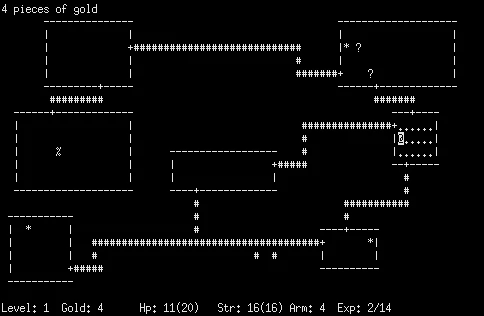
NetHack[2] (1987) is Rogue's direct descendant — still actively maintained, still the same terminal. Output and input together are enough for a game loop. Input arrives in the next chapter.